



If your OTOFIX D1 Diagnostic Tablet displays the error: “The USB port does not support the charging function, please replace the USB port if you need to charge!”, it is rarely a hardware fault. This message usually means the charging cable is plugged into a data port instead of the dedicated power port.

Quick Fix Steps
Follow these steps to resolve the charging error immediately:
Unplug the Cable: Remove the USB cable from the current port.
Locate Charging Port: Check the device diagram to identify the specific charging-compatible port.
Reconnect: Securely plug the cable into the correct designated port.
Verify: The error message will clear once the correct port is used.
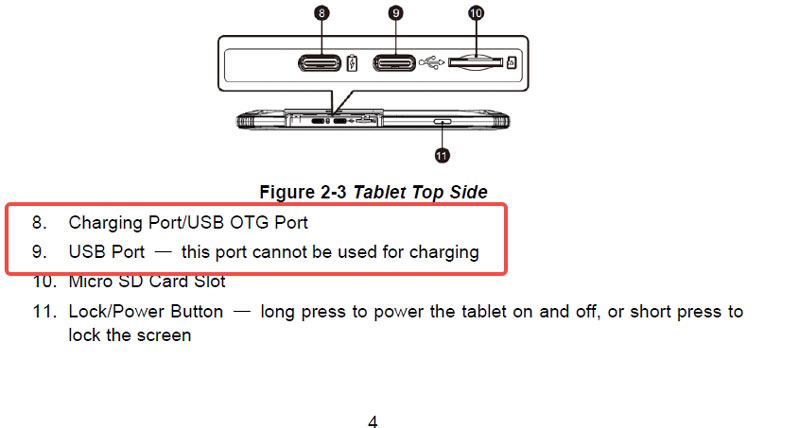
Why This Happens
The OTOFIX D1 distinguishes between data transfer and power input. Using a data-only USB port triggers this protective alert to ensure the device receives the appropriate voltage.
For more technical support,please contact
Jenny
Whatsapp:+86 19947637411
Email: Sales@AutelTools.eu
Leave a Reply