


General Information
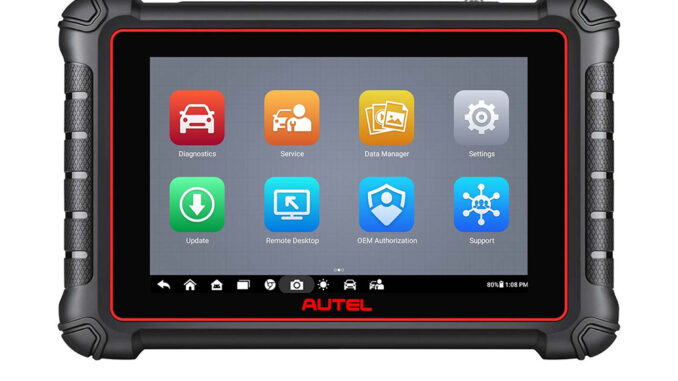
- What is the Autel MaxiCOM MK900?
It is an advanced bidirectional automotive diagnostic tool, an upgrade from the MK808S/MK808BT Pro. It supports comprehensive system diagnostics, 40+ service functions, CAN-FD, DOIP protocols, and over 3,000 active tests, running on Android 11 with 4GB RAM and 64GB storage.
- What are the key hardware specificationsAutel?
8-inch 1280×800 touchscreen, Rockchip RK3566 quad-core 1.8GHz processor, 7700mAh battery (7 hours continuous use), 8MP rear camera, USB-C, Wi-Fi, Bluetooth, and mini SD card slot.
- Which vehicles does it support?
It covers 7,000+ vehicle models (2006+) with AutoVIN for quick identification, including 2018+ FCA vehicles with SGW secure modules.
- What functions does it offer ?
All-system diagnostics, 40+ services (Oil Reset, EPB, SAS, DPF Regen, etc.), bidirectional active tests, DTC reading/erasing, live data, pre/post-scan, Wi-Fi printing, and cloud management.
- What is the update policy?
1-year free software updates; after that, a subscription is required for continued updates. Updates are pushed automatically when connected to the internetAutel.
Usage & Troubleshooting
- How to start vehicle diagnosis?
Connect to the vehicle via OBD2 cable. Use AutoVIN, scan VIN/license, or manually input the vehicle info. Then select the system to diagnose.
- Why can’t the tool connect to the vehicle?
Check the OBD2 cable/connections, ensure the vehicle is on (ignition on), verify internet connection (for AutoVIN), and confirm the vehicle is supported.
- How to perform active tests?
Go to the Diagnostics app, select the system/ECU, choose “Active Test”, and send commands to activate actuators (ABS, windows, etc.).
- How to update the device?
Connect to Wi-Fi, go to Settings > System Update. The tool will download and install updates automatically.
- What if the tool won’t turn on/charge?
For no power: Ensure charging (check adapter, cable, temperature, connections). If the charger is faulty, contact Autel support.
- How to use the battery test function?
Pair with the Autel BT506 battery tester via Bluetooth, then follow on-screen prompts to perform the test.
Subscription & Support
- How long is the warranty?
1-year standard warranty.
- How to get technical support?
Use the remote control tech support feature or contact Autel support/dealer for issues.
- Can I print diagnostic reports?
Yes, via Wi-Fi printing after generating a report in the Diagnostics app.
- How to manage workshop data?
Use the built-in workshop management to organize data files, customer info, and vehicle records.
Battery & Maintenance
- How to charge the battery?
Use the included USB-C adapter, charge via the vehicle (OBD2), or external power. The LED turns green when charged above 90%.
- Is the battery replaceable?
The built-in Li-ion Polymer battery is factory-replaceable only; do not tamper with it.
- How to extend battery life?
Turn off unused functions, reduce screen brightness, and power off when not in use.
Advanced Functions
- How to program TPMS sensors?
Use the TPMS diagnostic function to activate sensors, program Autel MX-Sensors, and perform relearn procedures.
- Can it do ECU coding?
Yes, it supports ECU coding for various vehicle systems (depends on the vehicle model).
Leave a Reply